Topic Sponsor
2009 - 2014 Ford F150 General discussion on 2009 - 2014 Ford F150 truck.
Sponsored by:
Sponsored by:

iPhone 5 and Sync

Thread Tools
 
Search this Thread
 
Old May 1, 2013 | 07:59 AM
  #21  
losttime's Avatar
Thread Starter
Senior Member
 
Joined: Mar 2013
Posts: 125
Likes: 18
From: NE Ohio
Default

well there you have it, I see one sprint working and on at&t. I have Verizon and it does not work and i don't have that pick on my sync screen. everything else is there but that.

Thanks Big Red
Reply
Old May 1, 2013 | 08:04 AM
  #22  
cameronskidoo's Avatar
Senior Member
 
Joined: Dec 2011
Posts: 145
Likes: 16
From: canada
Default

no show on MTS
Reply
Old May 1, 2013 | 08:17 AM
  #23  
cbvet's Avatar
Senior Member
10 Year Member
 
Joined: Oct 2012
Posts: 432
Likes: 117
From: Missouri
Default

I have Verizon and doesn't work, that's jacked up.
Reply
Old May 1, 2013 | 08:19 AM
  #24  
08Darkness's Avatar
Senior Member
 
Joined: Mar 2011
Posts: 390
Likes: 5

Default

Originally Posted by JBR74

Mine looks just like that except no "Show Notifications", it's just not there.
Are you connected to Sync while you're looking? You have to be paired up to have that option.
Reply
Old May 1, 2013 | 08:20 AM
  #25  
Brutus10's Avatar
Senior Member
 
Joined: Jan 2011
Posts: 141
Likes: 6
From: Tacoma, Washington
Default

No you don't. Just update your sync version at syncmyride.com and it should work.
Reply
Old May 1, 2013 | 08:20 AM
  #26  
08Darkness's Avatar
Senior Member
 
Joined: Mar 2011
Posts: 390
Likes: 5
Default

I have Verizon and mine works fine.
Reply
Old May 1, 2013 | 08:22 AM
  #27  
08Darkness's Avatar
Senior Member
 
Joined: Mar 2011
Posts: 390
Likes: 5
Default

Originally Posted by Brutus10
No you don't. Just update your sync version at syncmyride.com and it should work.
It's there after you turn it on the first time, but I didn't have the option til I was in the truck and paired with Sync.
Reply
Old May 1, 2013 | 09:30 AM
  #28  
Ladderco6's Avatar
Member
 
Joined: Apr 2012
Posts: 74
Likes: 3
Default

Originally Posted by Brutus10
No you don't. Just update your sync version at syncmyride.com and it should work.
What year is your truck? I have ATT service, IPhone 5 with 6.1.3 the most current software and my truck is a 2012 FX4 with Sync and Nav and I can't get my texting to work. I have never seen the "show notifications" on my phone. This is getting more and more confusing!

My Nav software is 4.1.3 which shows it as the most current

Last edited by Ladderco6; May 1, 2013 at 09:34 AM.
Reply
Old May 1, 2013 | 09:38 AM
  #29  
ianinedm's Avatar
Senior Member
 
Joined: Apr 2013
Posts: 956
Likes: 156
From: Edmonton
Default

I have a 4S on Rogers in Canada, when i was running Sync V3.2.1 just a few days ago, i could setup text messaging, although it didn't work at all. Since i updated to 3.5 all i get is the message below when i try to go to the messaging settings in my truck.
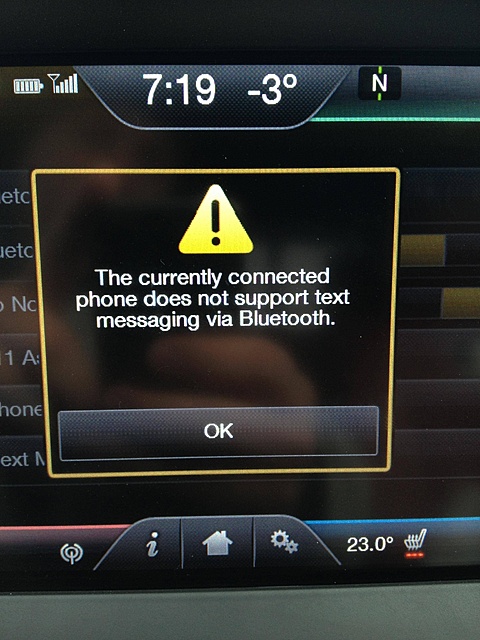
iPhone 5 and Sync-xjxfciu.jpg

Also, under the Bluetooth on my phone, I have no notification settings for the Bluetooth sync connection. I am running the newest iOS that is found on the iPhone 5 as well so I doubt it has anything to do with 4S vs 5.

I initially thought it couldn't handle iMessages, but it shut out all text messaging for me.

*edit: yes, it's -3 Celsius this morning, and snowing again. Thank god it's May 1st!.

Last edited by ianinedm; May 1, 2013 at 09:39 AM. Reason: change
Reply
Old May 1, 2013 | 09:39 AM
  #30  
Paul B's Avatar
Member
 
Joined: Mar 2013
Posts: 74
Likes: 3
From: Louisville, KY
Default

Originally Posted by Bob112Blue
If you have it, it will show

FWIW,
I have a 2013 Platinum
Iphone 5
Sprint

And my text messages/sync work just fine.
Reply


All times are GMT -4. The time now is 04:26 PM.