


Line in/aux question


Thread Starter
Member
Joined: Aug 2011
Posts: 17
Likes: 0
 Line in/aux question
Hey guys
I just picked up an 06 lariat and was trying to get the line in port on the top of the dash to work with the AUX button on the deck. I was receiving the "aux not found" kind of message so looked into things a bit further and popped off the trim piece around the deck and pulled the part of the dash out that contained the line in jack. What i noticed was that there isn't even a cable connecting the line in jack to the deck. Does any one know where to find a cable to connect the two together and even if the deck would support it? the deck currently does not have nav or sirius/xm built into it
thanks
I just picked up an 06 lariat and was trying to get the line in port on the top of the dash to work with the AUX button on the deck. I was receiving the "aux not found" kind of message so looked into things a bit further and popped off the trim piece around the deck and pulled the part of the dash out that contained the line in jack. What i noticed was that there isn't even a cable connecting the line in jack to the deck. Does any one know where to find a cable to connect the two together and even if the deck would support it? the deck currently does not have nav or sirius/xm built into it
thanks

Thread Starter
Member
Joined: Aug 2011
Posts: 17
Likes: 0
That's the problem, I'm not sure what the wire looks like, I know from the line in jack on the dash the wire needs to be a multi-pin connector square in shape I believe but need to pull the deck out to determine what connections are on the back
5 Year Member


Joined: Jun 2011
Posts: 4,716
Likes: 672
From: Hartford, WI
Stock or aftermarket head unit? When I installed my Pioneer, I unhooked that jack. It's just floating around behind the dash somewhere now. Then i ran an input wire through that same spot to the input on my receiver. There is a rubber grommet in that hole now so the wire won't fall into the dash.
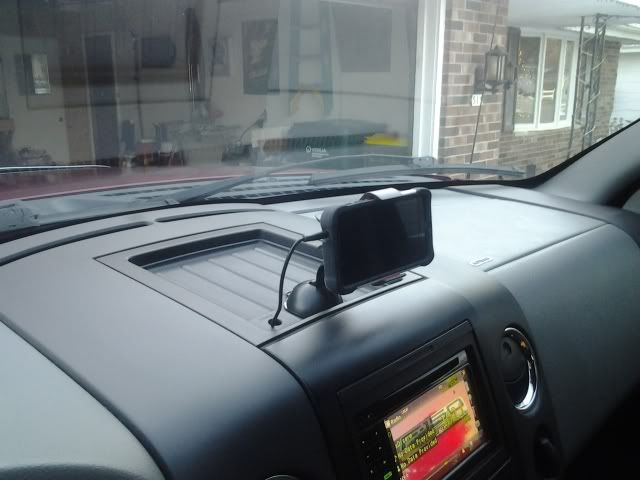

I thought for some reason the line in on the dash wasn't until 07 trucks. Maybe the 06's had it, could be very wrong on that memory since you apparently have the port on your dash.
Either way read though this post on another forum where a guy added the tray, cables, ect. However I would double check to make sure your 06 radio will work with it.
http://www.f150online.com/forums/hea...-help-pic.html
Either way read though this post on another forum where a guy added the tray, cables, ect. However I would double check to make sure your 06 radio will work with it.
http://www.f150online.com/forums/hea...-help-pic.html
Trending Topics

Senior Member
Joined: Jul 2012
Posts: 323
Likes: 30
From: Los Angeles County
Thread Starter
Member
Joined: Aug 2011
Posts: 17
Likes: 0
Ok so I've got some pics of the back of the deck and a couple other connectors I saw down in the dash as well as a pic of the back of the line in port on the top of the dash that isn't connected to the deck. I noticed there isn't any extra ports on the back of the head unit, does this mean the line in won't work with the head unit?
Thanks for any help
Thanks for any help