Adding a "message center" to your cluster


Thread Starter
Moderator (Ret.)

Joined: Sep 2008
Posts: 9,460
Likes: 486
From: Lake Mary Florida
 Adding a "message center" to your cluster
In my pursuit in finding how to get the Lariat cluster to work in other F150's (the air conditioning compressor issue), I ran accross this picture that was posted on another site. It describes how to add a message center to F150's that did not have one. The poster cut out the correct size oblong hole in the lower right hand side of his dash to install a message center, and then did these wiring splices to the two existing cluster harnesses:
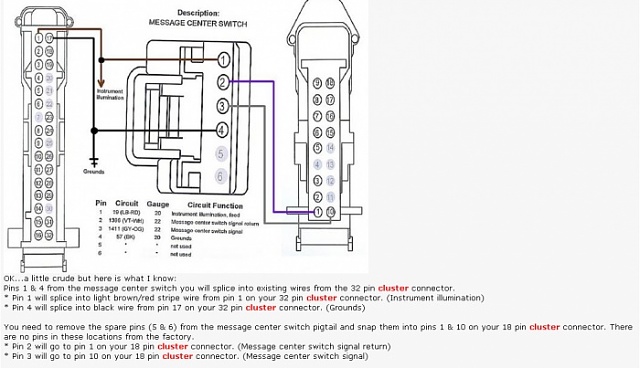
Not responsible for any damages, blown fuses, or other wiring mishaps.
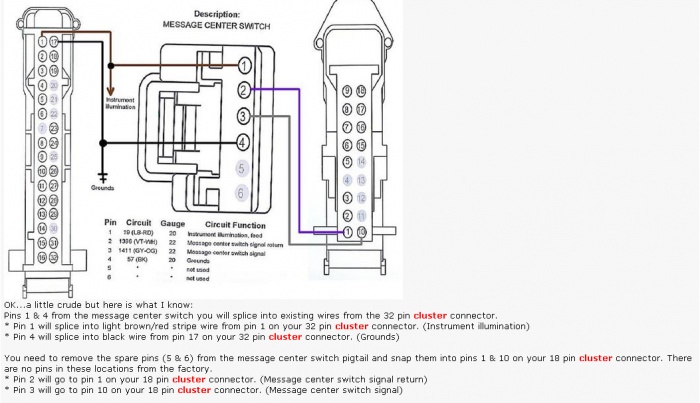
Not responsible for any damages, blown fuses, or other wiring mishaps.
Senior Member
Joined: Nov 2007
Posts: 557
Likes: 7
From: NYC
so doing what this diagram shows/says with switching and splicing wiring around should take my regular FX4 cluster that only shows me mileage,temperature and compass will show me everything else? like MPG, miles till empty,etc.? or ? little confused
Thread Starter
Moderator (Ret.)
Joined: Sep 2008
Posts: 9,460
Likes: 486
From: Lake Mary Florida
If someone could post a pic of this "message center", it would make it easier to "see". I don't own a Lariat, so I can't help you with a pic.
I'm also waiting on a response as to a "wire" that can be moved/spliced that allows the AC to work on a Lariat swapped cluster in a non Lariat truck.

Crew Member
Joined: Apr 2008
Posts: 430
Likes: 8
Lariat and King Ranch have the same Message Center.
There is no wire. The guy was talking about moving a wire when you did a EATC in a non EATC truck.
To get the lariat working, you need PCM flashed with AS Builts. Dealer can do this. WILL NOT correct mileage.
The wiring above will work. Just finished mine tonight. Mine only had 4 pins at the switches. Still wired the same.
Lariat does work with all functions in my XLT. MPG, Miles till empty, temp, direction, trip time, trip meter. And on screen truck checkup. Oil press, water temp, and such.
ANY Dealer can do this. I watched it be done and swapped clusters for them when it was time. Take original in, and new cluster. So simple it is "DUMB" of a stealership to say it cant be done. Hour labor and took like 20 minutes.
Reedy Ford in Arkansas City, Kansas is the bomb and waited for me after work and then showed me how it works and let me help!
P.S. Remember if you have your truck "programmed" to reset to stock befor going in. Or you WILL lose your "tunes".
Bucko I did alot of searching and it is wild all the info out there to do this swap and other along with adding EATC to a non EATC truck.
There is no wire. The guy was talking about moving a wire when you did a EATC in a non EATC truck.
To get the lariat working, you need PCM flashed with AS Builts. Dealer can do this. WILL NOT correct mileage.
The wiring above will work. Just finished mine tonight. Mine only had 4 pins at the switches. Still wired the same.
Lariat does work with all functions in my XLT. MPG, Miles till empty, temp, direction, trip time, trip meter. And on screen truck checkup. Oil press, water temp, and such.
ANY Dealer can do this. I watched it be done and swapped clusters for them when it was time. Take original in, and new cluster. So simple it is "DUMB" of a stealership to say it cant be done. Hour labor and took like 20 minutes.
Reedy Ford in Arkansas City, Kansas is the bomb and waited for me after work and then showed me how it works and let me help!
P.S. Remember if you have your truck "programmed" to reset to stock befor going in. Or you WILL lose your "tunes".
Bucko I did alot of searching and it is wild all the info out there to do this swap and other along with adding EATC to a non EATC truck.
Thread Starter
Moderator (Ret.)
Joined: Sep 2008
Posts: 9,460
Likes: 486
From: Lake Mary Florida
I too did lots or research and did lots or write-ups on my findings to share with the rest of the 04 to 08 F150 world....your help is greatly appretiated.
You have posted your comments on another thread I have "ongoing" within this forum. I intend to add this to our sticky at the beginning of this forum once we get the facts straight.
You have posted your comments on another thread I have "ongoing" within this forum. I intend to add this to our sticky at the beginning of this forum once we get the facts straight.

Senior Member
Joined: Oct 2007
Posts: 465
Likes: 1
From: NY
07 message center with the control buttons. Avg mpg's, distance to empty, trip a, trip b, and other messages like door open, low fuel (hate that one) and probably other stuff I havent seen yet.
Last edited by nashtruck; Apr 7, 2010 at 09:25 AM.
Trending Topics
Thread Starter
Moderator (Ret.)
Joined: Sep 2008
Posts: 9,460
Likes: 486
From: Lake Mary Florida
racinjasin68, with your "new" Lariat cluster installed and updated with the "as build" data from your old cluster, do your dome lights work when the doors are opened? You may not have had the "door ajar" display; those I think were with the STX, XL, and maybe XLT models.
Last edited by Mod (Ret.); Apr 7, 2010 at 01:20 PM.