


Underside LED Lights

Senior Member
Joined: Jun 2011
Posts: 2,962
Likes: 14
From: Texas

I bought mine from O'reily auto parts but im sure you can get it from autozone. Just give yourself a good amount of time to do it. I plugged my "add-a-circuit" into my a/c fuse slot and put the a/c fuse and a new fuse in the kit, then ran my power wire from the kit to a toggle switch, then to the lights, and grounded both the switch and lights to two bolts. I'll try to take pictures and upload them.

Thread Starter
Senior Member
Joined: Jul 2011
Posts: 551
Likes: 14
From: Texas
I bought mine from O'reily auto parts but im sure you can get it from autozone. Just give yourself a good amount of time to do it. I plugged my "add-a-circuit" into my a/c fuse slot and put the a/c fuse and a new fuse in the kit, then ran my power wire from the kit to a toggle switch, then to the lights, and grounded both the switch and lights to two bolts. I'll try to take pictures and upload them.
Senior Member
Joined: Jun 2011
Posts: 2,962
Likes: 14
From: Texas
This is the "add-a-circuit" i bought

I plugged it into the a/c fuse slot in the fuse box and ran the wire to the toggle switch.

This is the back of the switch. I connected the wire from the "add-a-circuit" to the "power" on the switch(bottom red wire). I connected the wires from the lights to the "load" on the switch(middle red wire). I also grounded the switch to a near by bolt(top black wire). The connection ended up in that order by how I put the switch in but the specifics (power, load, and ground) should be labeled on the switch.

These are the LED lights I bought and they shine down on my feet. Each light had a power wire(red) and a ground wire(black)


I grounded the black wire from the switch by itself to a bolt and grounded the black wires from the lights together to a different bolt.

My switch is near the floor in the plastic panel that i removed in order to connect everything.

I also bought the red wire connectors to connect to the switch and the blue ring terminals to ground each black wire. You can see those in the picture of the switch and the grounded wires.
I plugged it into the a/c fuse slot in the fuse box and ran the wire to the toggle switch.
This is the back of the switch. I connected the wire from the "add-a-circuit" to the "power" on the switch(bottom red wire). I connected the wires from the lights to the "load" on the switch(middle red wire). I also grounded the switch to a near by bolt(top black wire). The connection ended up in that order by how I put the switch in but the specifics (power, load, and ground) should be labeled on the switch.
These are the LED lights I bought and they shine down on my feet. Each light had a power wire(red) and a ground wire(black)
I grounded the black wire from the switch by itself to a bolt and grounded the black wires from the lights together to a different bolt.
My switch is near the floor in the plastic panel that i removed in order to connect everything.
I also bought the red wire connectors to connect to the switch and the blue ring terminals to ground each black wire. You can see those in the picture of the switch and the grounded wires.
Thread Starter
Senior Member
Joined: Jul 2011
Posts: 551
Likes: 14
From: Texas
Originally Posted by eej711
Sorry the pictures are really big. I hope this helps.


Senior Member
Joined: Jun 2011
Posts: 2,962
Likes: 14
From: Texas
I forgot to mention I had to cut out some of the plastic walls on the inside of the fuse box cover so it would fit around the addacircuit.
Here is what mine look like.
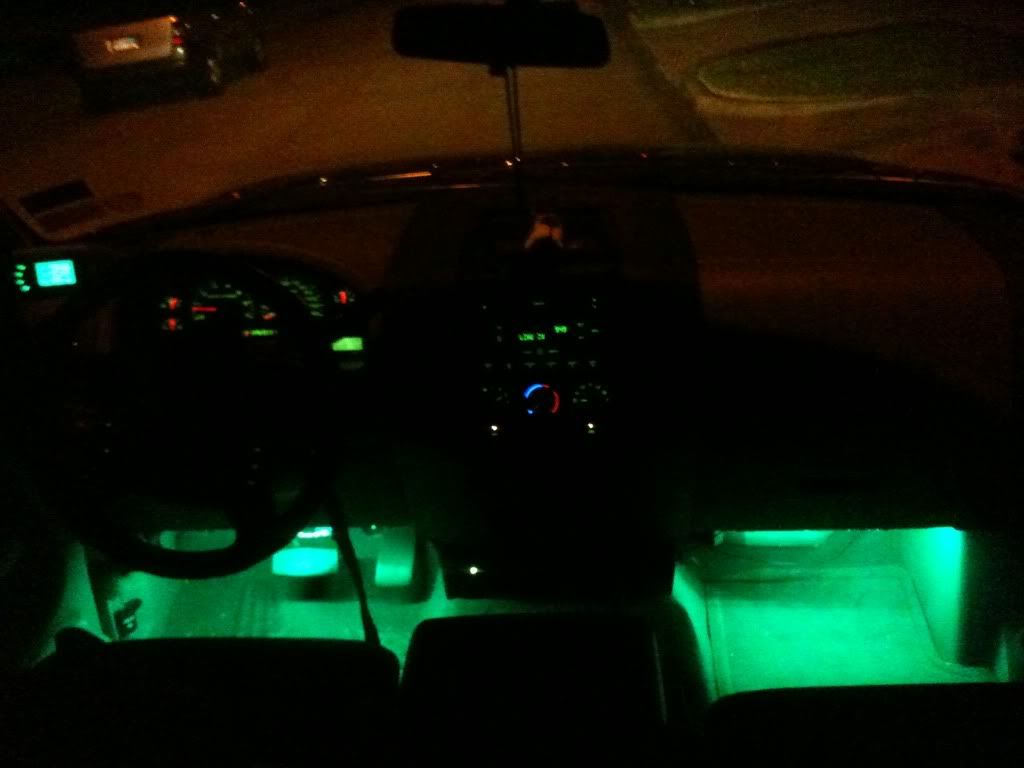
Here is what mine look like.
Last edited by eej711; Jul 12, 2011 at 12:09 AM.
