When you click on links to various merchants on this site and make a purchase, this can result in this site earning a commission. Affiliate programs and affiliations include, but are not limited to, the eBay Partner Network.
So I finally got around to upgrading my stereo from the 4.2" MyFord radio. I'm really happy with the way it came out. The only piece I have to still figure out is what to do with USB cable for CarPlay. Currently it is in the glove box, but I want to find a place to permanently mount the end so I dont have to open and then close the glove box on the cable to access CarPlay. Has anyone done something similar with their USB connection?
I have the factory 8” screen, but I purchased a flat USB (iPhone) cable and it sits in the little cubby below the radio. There is enough of a gap that I can still latch the cubby with the cable out, and it tucks nicely in the cubby when not in use.
Last edited by nerdh3rd; Jan 18, 2019 at 10:01 PM.
Pioneer AVH-1440NEX head unit and the new surround is by Metra Electronics. It retains all the steering wheel controls and includes a touch screen that replaced the manual heating/air controls
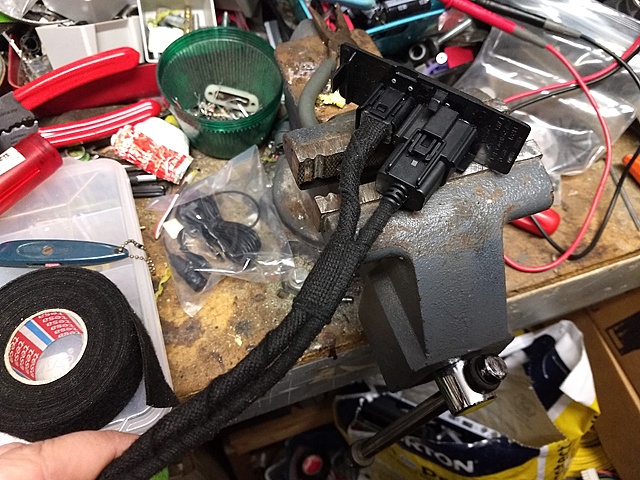
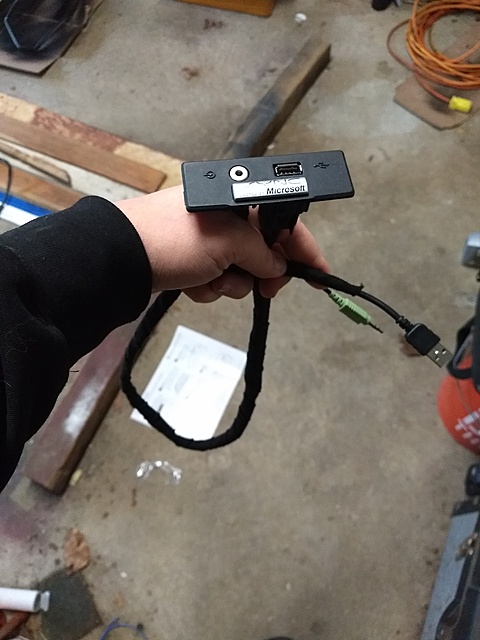
Was there a USB from the factory? For me there was a plate at the bottom of the dash with an 1/8" jack and USB port. I pulled the factory USB cable back then cut and soldered a different end on so it plugged directly into the new headunit (Pioneer 2440NEX).
Was there a USB from the factory? For me there was a plate at the bottom of the dash with an 1/8" jack and USB port. I pulled the factory USB cable back then cut and soldered a different end on so it plugged directly into the new headunit (Pioneer 2440NEX).
I may be going that route. Thanks. My other option I’ve been thinking about is essentially leave the USB cord that is currently hooked up and run it to the stupid cubby right next to the glove box if I can find something to attach it to that looks right.
Pioneer AVH-1440NEX head unit and the new surround is by Metra Electronics. It retains all the steering wheel controls and includes a touch screen that replaced the manual heating/air controls




 Finally upgraded stereo