


2013 XLT Audio system


Thread Starter
Junior Member
Joined: Oct 2014
Posts: 6
Likes: 0
 2013 XLT Audio system
Hello, I bought a 2013 F150 3 wks ago and Im still trying to figure out how to use the buttons below the screen with the corresponding text on the bottom of the screen itself ( - , replay, direct, info ) Any help would be greatly appreciated.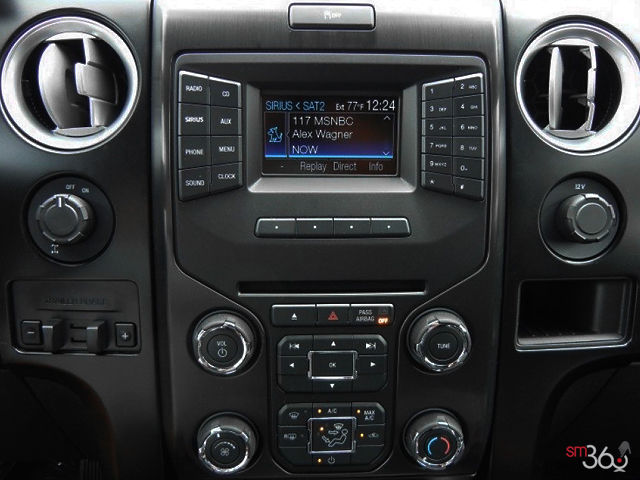

Member
Joined: Aug 2011
Posts: 1,278
Likes: 168
From: Cleveland, MN
Push the corresponding button to get the function.
Functions change depending on what source is selected.
It's kind of stupid because in Radio mode the left is "MUTE" but goes blank in other modes. Why not just leave it "MUTE" instead of blanking it? Just another FORD FAIL!
Functions change depending on what source is selected.
It's kind of stupid because in Radio mode the left is "MUTE" but goes blank in other modes. Why not just leave it "MUTE" instead of blanking it? Just another FORD FAIL!

I'd rather be sailing.


Joined: Jul 2013
Posts: 392
Likes: 100
From: Everett Wa
I'm with jadaizin,
I know the "Direct" allows you type in a Sirius channel directly
"Replay" I have no idea.
In FM mode it implies I can pause and replay the radio. Sometimes I get into a mode and can not get out. Anyone with a working description of the same display in FM mode?
Guess I could RTFM.
Thanks
Scott
I know the "Direct" allows you type in a Sirius channel directly
"Replay" I have no idea.
In FM mode it implies I can pause and replay the radio. Sometimes I get into a mode and can not get out. Anyone with a working description of the same display in FM mode?
Guess I could RTFM.
Thanks
Scott

Member
Joined: Feb 2013
Posts: 26,680
Likes: 6,253
From: Big Easy
http://www.fordservicecontent.com/Fo.../13f12om3e.pdf page 142.
I find the online manual a lot easier as you can search by key word. That link is for a 2013 but if you sign up for a free account at www.owner.ford.com you can access all the latest info including a manual for your year model.
.
I find the online manual a lot easier as you can search by key word. That link is for a 2013 but if you sign up for a free account at www.owner.ford.com you can access all the latest info including a manual for your year model.
.