Topic Sponsor
2015 - 2020 Ford F150 General discussion on the 13th generation Ford F150 truck.
Sponsored by:
Sponsored by: Worksport

How do you change the date?

Thread Tools
 
Search this Thread
 
Old May 3, 2021 | 10:53 AM
  #1  
aquaman67's Avatar
Thread Starter
5 Year Member
5 Year Member
Liked
Loved
Community Favorite
 
Joined: Oct 2019
Posts: 251
Likes: 109
Default How do you change the date?

I have Sync 3 and the small screen on my XL.

I turned off the radio and noticed the date is wrong, one day fast. The date pops up on the top left, only when the radio is off.

The clock set menu doesn’t let you change the date.

I’ve googled and searched here but I can’t find any setting on any menu to change the date.

Help.
Reply
Old May 13, 2021 | 09:08 PM
  #2  
aquaman67's Avatar
Thread Starter
5 Year Member
5 Year Member
Liked
Loved
Community Favorite
 
Joined: Oct 2019
Posts: 251
Likes: 109
Default

Went in for an oil change and asked the dealer. They said there is no setting and it required a re-programming (the bcm I believe)

So is there a FORSCAN way to change the date?

BTW the dealer said it was common for Rangers to be a day late but this was the first F150 they had seen.
Reply
Old May 22, 2023 | 12:36 PM
  #3  
2008__XL's Avatar
Community Team
10 Year Member
Liked
Loved
Community Favorite
 
Joined: Jun 2016
Posts: 8,980
Likes: 7,513
From: Vermont
Default

Anyone ever figure this out? Mine says it’s 2020 when the radio is off. It’s rarely off so not a huge deal.

But kind of dumb they don’t have an easy way to change the date.
Reply
Old May 22, 2023 | 03:55 PM
  #4  
aquaman67's Avatar
Thread Starter
5 Year Member
5 Year Member
Liked
Loved
Community Favorite
 
Joined: Oct 2019
Posts: 251
Likes: 109
Default

Originally Posted by 2008__XL
Anyone ever figure this out? Mine says it’s 2020 when the radio is off. It’s rarely off so not a huge deal.

But kind of dumb they don’t have an easy way to change the date.
I did the sync update (using a usb drive to download then upload to truck) and it changed the date to the correct day month and year.

your dealer can do it they just don’t want to.
Reply
Old May 22, 2023 | 04:04 PM
  #5  
2008__XL's Avatar
Community Team
10 Year Member
Liked
Loved
Community Favorite
 
Joined: Jun 2016
Posts: 8,980
Likes: 7,513
From: Vermont
Default

Originally Posted by aquaman67
I did the sync update (using a usb drive to download then upload to truck) and it changed the date to the correct day month and year.

your dealer can do it they just don’t want to.
I never asked the dealer to. I’m just going to forget about it I guess. It’s pretty stupid Ford doesn’t let you change the date.

Reply
Old May 22, 2023 | 05:51 PM
  #6  
Dhavi4226's Avatar
5 Year Member
Veteran: Navy
5 Year Member
 
Joined: Jan 2020
Posts: 559
Likes: 276
Default

Look in the Audio section of the owners manual.
Reply
Old May 22, 2023 | 07:30 PM
  #7  
picaFord's Avatar
Senior Member
Liked
Loved
Community Favorite
 
Joined: Jun 2022
Posts: 276
Likes: 154
Default

Maybe if you try to connect to internet by wifi it could sync with internet time
Reply
Old May 24, 2023 | 07:00 AM
  #8  
2008__XL's Avatar
Community Team
10 Year Member
Liked
Loved
Community Favorite
 
Joined: Jun 2016
Posts: 8,980
Likes: 7,513
From: Vermont
Default

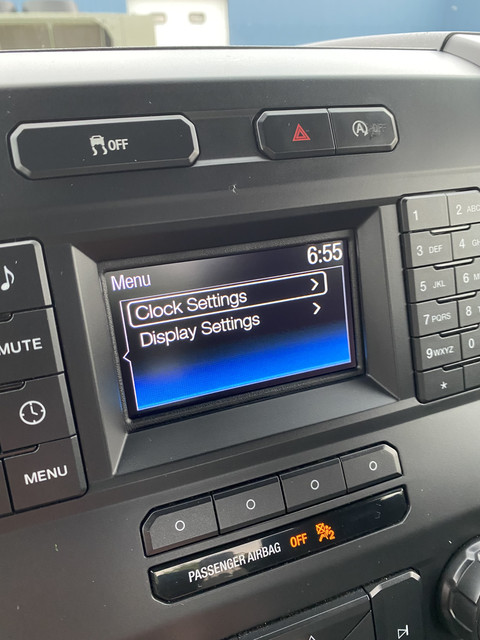
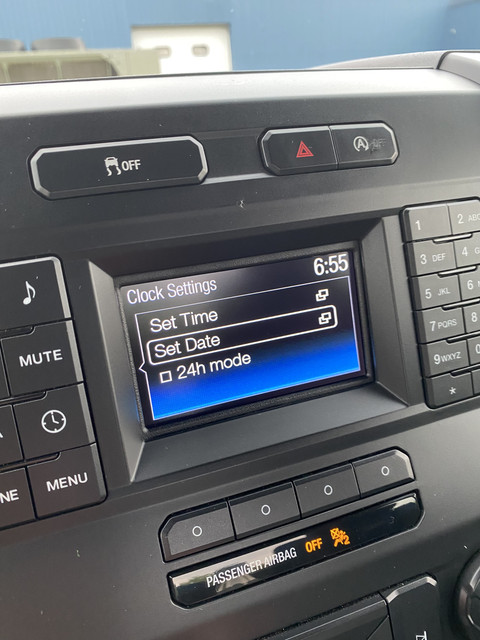
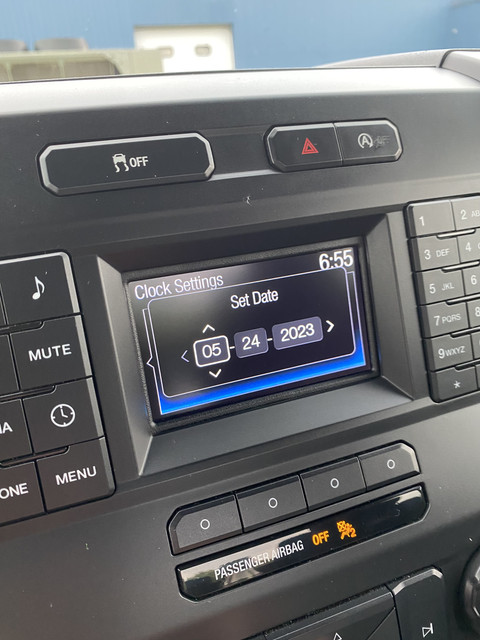
Nothing in the manual but I figured it out.

with the truck in accessory mode and radio off, you can change the date.

menu / clock settings / set date:


Reply
Old May 24, 2023 | 12:12 PM
  #9  
RobTx's Avatar
Senior Member
 
Joined: Feb 2018
Posts: 948
Likes: 651
Default

I never even noticed the date was displayed on the screen! Now I need to go check mine, just to see if it is correct, lol.
Reply
Old May 24, 2023 | 02:19 PM
  #10  
aquaman67's Avatar
Thread Starter
5 Year Member
5 Year Member
Liked
Loved
Community Favorite
 
Joined: Oct 2019
Posts: 251
Likes: 109
Default

Originally Posted by 2008__XL
Nothing in the manual but I figured it out.

with the truck in accessory mode and radio off, you can change the date.

menu / clock settings / set date:


what year truck and what sync version?

that doesn’t work on my truck.

2019 XL regular cab.

sync 3 version 3.4.22200

with the radio off you can’t access any of the functions.
Reply


All times are GMT -4. The time now is 05:04 AM.