


Viper 5901 Install...


Thread Starter
5 Year Member

Joined: Oct 2009
Posts: 1,676
Likes: 122
From: Wilmington, NC
 Viper 5901 Install...
Ok, I decided with my new truck I am going to get the Viper 5901 Alarm/Remote Start. Did anyone put it in themselves and if so do you have any tips, guides etc?
I found the system online for $200, I wanted to know if anyone has purchased it and if you got the latest firmware for it when you got it and if so from who?
Thanks,
Bob
I found the system online for $200, I wanted to know if anyone has purchased it and if you got the latest firmware for it when you got it and if so from who?
Thanks,
Bob

Ford Tech
Joined: Apr 2010
Posts: 27
Likes: 1
From: Florida
Ordered up on for my truck too, going to install it myself. Do not forget the PKALL transponder for the pats system. I am getting the bitwriter too so I can take advantage of all the programming. Good luck.
Thread Starter
5 Year Member
Joined: Oct 2009
Posts: 1,676
Likes: 122
From: Wilmington, NC
Does the bitwriter also come with the software? I know about the pkall transponder but doesn't that require one of the keys or am I wrong? Lastly, is yours a 2011?

Senior Member
Joined: Sep 2009
Posts: 348
Likes: 3
From: Kansas City, MO
If you are going to install it yourself you might consider buying from KCautosound. He will "prewire" the system for your vehicle and give you instructions specific to your vehicle. The owner Travis is very nice. Give him a call with your question. I live in KC and had him install an alarm on mine. He does installs for several ford dealers in the area also.
http://www.kcautosound.com/Viper-590...te-pr-944.html
http://www.kcautosound.com/Viper-590...te-pr-944.html
Thread Starter
5 Year Member
Joined: Oct 2009
Posts: 1,676
Likes: 122
From: Wilmington, NC
I used Travis for my last one which was a Ford Factory (Code Alarm) but his prices are very high for the same system $350 vs $200. $150 is a lot when you have limited funds and that doesn't include the charge for the pre-wiring.
Ford Tech
Joined: Apr 2010
Posts: 27
Likes: 1
From: Florida

Senior Member
Joined: Oct 2010
Posts: 218
Likes: 5
does anyone know which module works for sure for remote start? i see people recommending pkall but on DEI website i also see that they now have dball which seems like it has more capability than pkall but im not sure if it will work. unfortunately, i purchased my alarm in august and got the canmax400, which is no longer available, and to this day im unable to program remote start
Trending Topics
Member
Joined: Apr 2010
Posts: 51
Likes: 0
From: Minnesota
I recently installed a Viper 5901 and PKALL in my 2010 FX4.
This is the wiring I used:
H1/1: Trunk Output - N/A
H1/2: +12v Constant - (PUR/RED at Ignition Harness)
H1/3: Siren
H1/4: Park Light Iso - N/A
H1/5: GND
H1/6: (+)Door Trigger - N/A
H1/7: Trunk Pin - N/A
H1/8: (-)Door Trigger (Diodes on the 4 doorpin wires in SmartBoxJunction)
H1/9: Dome Light - N/A
H1/10: Turbo Timer - N/A
H1/11: Park Light Output - (PUR/WHT at SBJ)
H1/12: GND Armed - N/A
H3/1: IGN 1 (WHT/ORG at Ignition Harness)
H3/2: Flex Input - N/A
H3/3: ACC (PUR/GRN at Ignition Harness)
H3/4: Starter Out (BLU/WHT at Ignition Harness)
H3/5: Starter In - N/A
H3/6: IGN 1 Input (PUR/RED at Ignition Harness)
H3/7: Flex Out - N/A
H3/8: Flex In - N/A
H3/9: ACC/START Input - (PUR/RED at Ignition Harness)
H2/6: 200a Aux Output (Rear Defroster wire behind radio)
H2/8: Horn Output (BLU/WHT at Steering Harness)
H2/10: Status Out (PKALL (-) while running)
H2/11: Hoodpin (Hoodpin (GND when opened)
H2/17: Brake Input (PUR/WHT at Brake Harness)
H2/18: Neutral Safety (GND)
and some pictures:
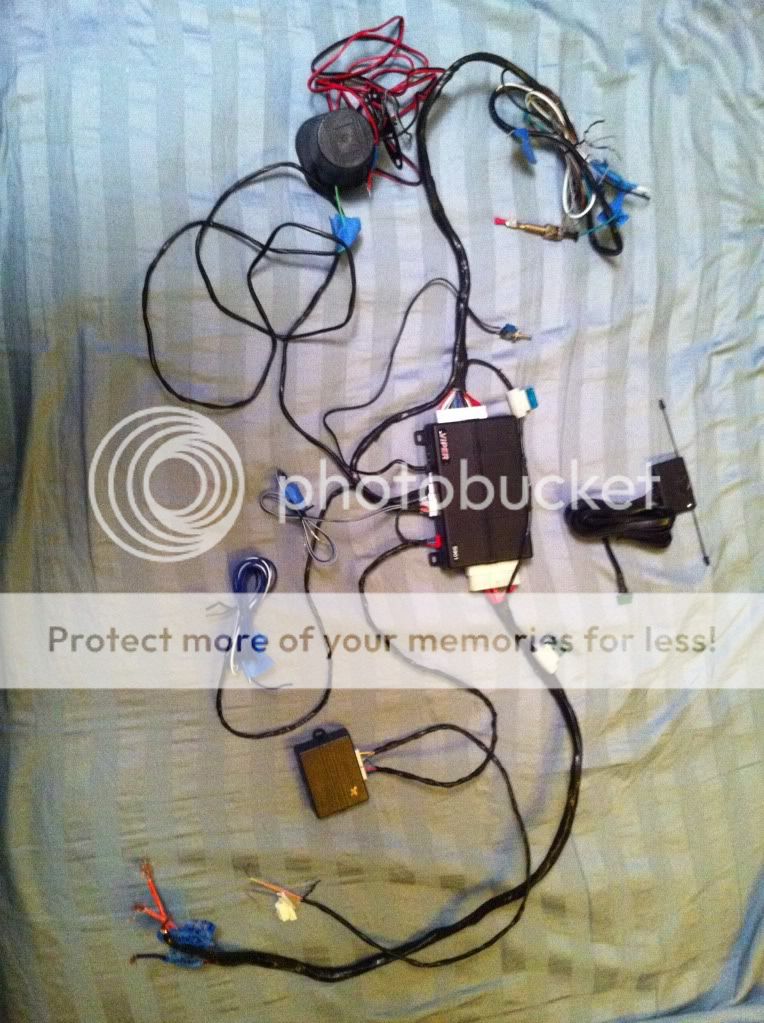
The Viper 5901 with the wiring all wrapped up ready to install
The PKALL

This is directions on how to do diode isolate the Door Trigger

Here is the plug from the PATS system on the truck were you'll need to connect your PKALL

The pictures from this post helped out greatly in finding the right wires:
https://www.f150forum.com/f38/2010-re...s-match-71887/
This is the wiring I used:
H1/1: Trunk Output - N/A
H1/2: +12v Constant - (PUR/RED at Ignition Harness)
H1/3: Siren
H1/4: Park Light Iso - N/A
H1/5: GND
H1/6: (+)Door Trigger - N/A
H1/7: Trunk Pin - N/A
H1/8: (-)Door Trigger (Diodes on the 4 doorpin wires in SmartBoxJunction)
H1/9: Dome Light - N/A
H1/10: Turbo Timer - N/A
H1/11: Park Light Output - (PUR/WHT at SBJ)
H1/12: GND Armed - N/A
H3/1: IGN 1 (WHT/ORG at Ignition Harness)
H3/2: Flex Input - N/A
H3/3: ACC (PUR/GRN at Ignition Harness)
H3/4: Starter Out (BLU/WHT at Ignition Harness)
H3/5: Starter In - N/A
H3/6: IGN 1 Input (PUR/RED at Ignition Harness)
H3/7: Flex Out - N/A
H3/8: Flex In - N/A
H3/9: ACC/START Input - (PUR/RED at Ignition Harness)
H2/6: 200a Aux Output (Rear Defroster wire behind radio)
H2/8: Horn Output (BLU/WHT at Steering Harness)
H2/10: Status Out (PKALL (-) while running)
H2/11: Hoodpin (Hoodpin (GND when opened)
H2/17: Brake Input (PUR/WHT at Brake Harness)
H2/18: Neutral Safety (GND)
and some pictures:
The Viper 5901 with the wiring all wrapped up ready to install
The PKALL
This is directions on how to do diode isolate the Door Trigger
Here is the plug from the PATS system on the truck were you'll need to connect your PKALL
The pictures from this post helped out greatly in finding the right wires:
https://www.f150forum.com/f38/2010-re...s-match-71887/
Thread Starter
5 Year Member
Joined: Oct 2009
Posts: 1,676
Likes: 122
From: Wilmington, NC
The bitwriter comes with the software and the pkall transponder does not require additional keys. You will need both of your keys to program the transponder. I agree Travis is 150 dollars more. Where will you purchase your's? I think I will purchase from http://www.caraudiogiants.com/. They seem to have a good price.

