


How to use Photobucket

Thread Starter
Senior Member

Joined: Nov 2006
Posts: 6,986
Likes: 7
From: Minocqua Wi
 How to use Photobucket
Okay, I am going to make a step by step writeup on how to use www.photobucket.com, for the easyest photo hosting you will ever encounter.
first of all, go to www.photobucket.com, and click on the "join now" button in the middle of the page.

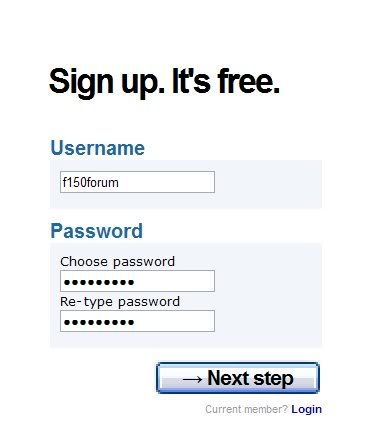
you will then see a page that looks like this, fill it out, and click the next step button on the bottom
you will then see this page, which asks for more information, which you need to fill in, and I reccomend unchecking the box that asks you if you want to enter for a chance to be entered into a 10000 dollar sweepstakes, it only makes the process longer.

first of all, go to www.photobucket.com, and click on the "join now" button in the middle of the page.
you will then see a page that looks like this, fill it out, and click the next step button on the bottom
you will then see this page, which asks for more information, which you need to fill in, and I reccomend unchecking the box that asks you if you want to enter for a chance to be entered into a 10000 dollar sweepstakes, it only makes the process longer.
Last edited by Ty; Feb 10, 2008 at 12:22 AM.
Thread Starter
Senior Member
Joined: Nov 2006
Posts: 6,986
Likes: 7
From: Minocqua Wi
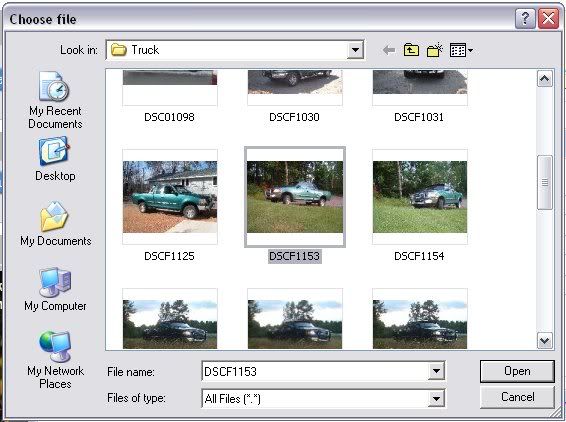
first, click on the browse button next to the blank as seen in the previous picture, and a new window will come up, asking ou to sellect the file you want to upload. Find the picture you want (I will be using a old picture of my truck) and hit the open button.
once you have done that you just have to hit the upload button, and you have secesfully uploaded your first picture to photobucket!
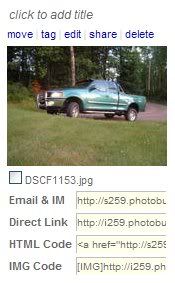
now, I will show you how to post your picture on this website. First you click on the "img" code on the very bottom of the list of options, and it will automatically coppy the text for you.
Then you come to this site, and hit the Ctrl button and the "V" button that the same time, and you will see the immage code for the picture that you have uploaded, ans your picture will show up once you make your post.
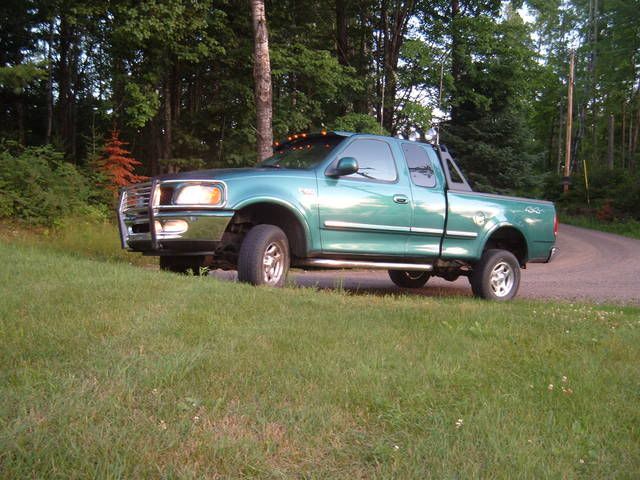
once you have done that you just have to hit the upload button, and you have secesfully uploaded your first picture to photobucket!
now, I will show you how to post your picture on this website. First you click on the "img" code on the very bottom of the list of options, and it will automatically coppy the text for you.
Then you come to this site, and hit the Ctrl button and the "V" button that the same time, and you will see the immage code for the picture that you have uploaded, ans your picture will show up once you make your post.
Last edited by Ty; Feb 10, 2008 at 12:13 AM.
Thread Starter
Senior Member
Joined: Nov 2006
Posts: 6,986
Likes: 7
From: Minocqua Wi
okay, now you have a few more options when it comes to using photobucket, you can upload your picture and have it appear as a certan size. first you need to click here, where it says options.
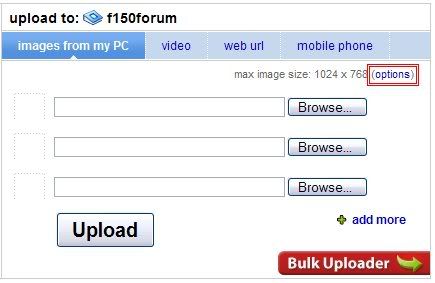
then, you will see this page, which allows you to sellect what size your picture will be uploaded as, I use 640x480 because it fits nicely on this site. you can also sellect 100x75 to resize your picture for use as a avatar.

Okay, now everyone can now use photobucke with ease, but the bad part is that you no longer have ANY excuse not to post up pictures.
I hope that this helps people out!
Ty
then, you will see this page, which allows you to sellect what size your picture will be uploaded as, I use 640x480 because it fits nicely on this site. you can also sellect 100x75 to resize your picture for use as a avatar.
Okay, now everyone can now use photobucke with ease, but the bad part is that you no longer have ANY excuse not to post up pictures.
I hope that this helps people out!
Ty
Last edited by Ty; Feb 10, 2008 at 12:23 AM.
Thread Starter
Senior Member
Joined: Nov 2006
Posts: 6,986
Likes: 7
From: Minocqua Wi
Can everyone read through this and tell me if there are any places that are not clear, or could use more pictures or explination, or any other parts of photobucket that need explaining?

workin for parts!!!
Joined: Nov 2007
Posts: 1,540
Likes: 29
From: watson lake,yukon
thanx ty, this will help everyone, there's evan hope for me . i've never had to do the "control v" thingee. that's new to me. when i go and copy the img code,i then go to the post and hit paste and my pics have been showing up. i still have trouble with posting a pic when it's an attachment in an email. i just move it into my pics on the puter and then i move them to photobucket. but that is a great how-to post
. i've never had to do the "control v" thingee. that's new to me. when i go and copy the img code,i then go to the post and hit paste and my pics have been showing up. i still have trouble with posting a pic when it's an attachment in an email. i just move it into my pics on the puter and then i move them to photobucket. but that is a great how-to post

Trending Topics

No Pain, No Pain!
Joined: Jul 2007
Posts: 4,825
Likes: 12
From: Baltimore, Maryland
A thorough explanation of how to host pics on photobucket. I am sure it will be very useful to the members here.
Is everyone aware that this forum has it's own upload feature?
You can use it to browse the folders on your computer and select which pics you want to upload. And you don't have to join any file hosting sites to use it.
Just another option for posting your pics!
Is everyone aware that this forum has it's own upload feature?
You can use it to browse the folders on your computer and select which pics you want to upload. And you don't have to join any file hosting sites to use it.
Just another option for posting your pics!
No Pain, No Pain!
Joined: Jul 2007
Posts: 4,825
Likes: 12
From: Baltimore, Maryland
I know the board has a file size limit, but I have been posting pics of my truck, without resizing them and I have not had any problems so far. My camera has something like 4 different resolution sizes to choose from. Currently, the size is set for 1280x960 and the pics are around 200-350kb each. The board limit is 117.2kb at 800x700.